Bruschetta, Sauce or Salsa?
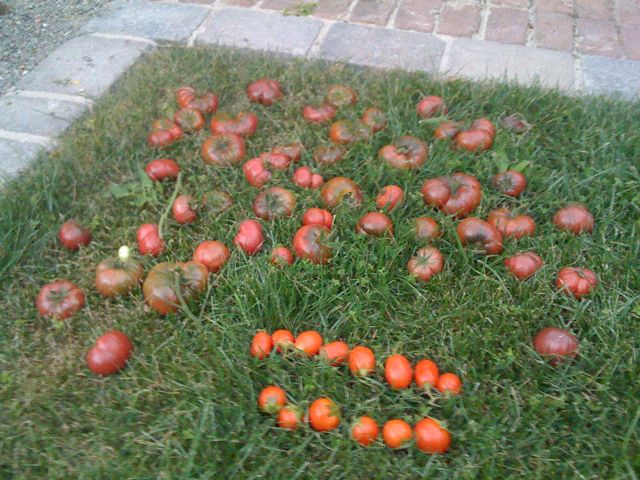
First half of the tomato harvest. Grandmother’s tomato sauce in the works. Anyone have a good salsa recipe?
Set Fire to Poop in My Driveway?
Hold the press! Apparently driveways *do* have a public cost:
If the bags had poop in them, that would be irony indeed.
Jailbroken iPhone App Review
So I got brave and jailbroke (?) my iPhone. QuickPwn was easy, but I got into a reboot cycle that may have either been caused by a) too many apps or b) iTunes being open. (I got bitten by the too-many-apps (4 pages) issue in 2.0 — if you have lots, you may want to google around first.)
A couple of interesting jailbreaking observations:
- Cydia rocks. Who knew package management could be so beautiful?
- Backgrounder is cool, but I quickly lose track of what I have running. If you install MobileTerminal you can run ‘top’ to see what’s up. You press and hold the home key to enable background mode for an app. (It took me a little while to figure out that when I went back to a backgrounded app, pressing and holding turns *off* backgrounding. Just tap normally to keep it backgrounded.)
- VLC is available from zodTTD.com — he’s the guy who did the Gameboy and many other emulators. If you make a $5 donation you get access. It’s buggy, but it works. I’ve streamed .asx windows media files to my phone. The audio is a little choppy and the pitch is off, but it’s a way to get access to those .wav/.asx/.wmv files (i.e. streaming sports, specifically hockey, specifically the Canucks. I hate .asx. And VLC will let me hate it for listening to the Canucks lose. Lovely.)
- Cycorder does video *really* well. Respectable quality and framerate, even at night, and compression for reasonable file size. You need to enable ssh and SFTP the files out though.
- Qik streams video *live* from your phone in real time — very impressive. Be careful, as the default setting is public meaning the entire world can see your clips. You can tap the screen to make a video private; a group can be defined on the web site, but I don’t see a way to associate a video with a group, so it’s all or nothing right now. But it’s a pretty remarkable tool, both in terms of quality and ease of use. I was getting about a 5 seconds latency in the live video.
- Snapture is a Camera replacement, lots more features including 3x digital zoom, rapid-fire picture mode, and multiple ways to take pictures including tapping on the screen and the volume button. Ad-driven free mode and a paid mode I haven’t tried. A little flaky though, frozen on me a couple of times.
- BossPrefs — all sorts of handy shortcuts for system settings, including individual Edge, 3G and WiFi toggles. (Be careful of the “SSH on Reboot Always” setting if you haven’t changed your root password, as anyone could get in (type ‘passwd’ in MobileTerminal…) No ‘Location’ toggle though.
- I really wanted to try IntelliScreen — it displays new mail and calendar entries on the lock screen like SMS — but it caused *big* problems with Mail (as in not checking it after 3 minutes and causing it to crash). But I’ve heard other good reports so maybe it was just me.
- Podcaster, one of my favorite apps (I love podcasts but *hate* syncing to get them) is available if you didn’t manage to grab the App store version.
The verdict? Burrito Justice SERVED.
All in all, lots of interesting apps, and the standard unix goodness. The revenue models are challenging — lots of ad driven ones, and some questionable (effectively charging for VLC — Burrito Justice is torn on this one), but such is the nefarious underbelly of the jailbreak scene. But a good outlet to keep Apple honest.
On a separate note, the Fring app (not jailbroken any longer) seems a solid VOIP and mobile IM client. Unsurprisingly, VOIP only works over wifi. I’ve only tried Fring-to-Fring calls — good quality, though I’ve heard mixed reviews re Skype. Good address book integration, but apparently some issues with number formatting (+1, etc). Will try my European friends and see how it behaves.
Solid multi-protocol IM performance, though no indication of which service someone is on, and no bundling of friends with multiple IM addresses a la Adium.
Best of all, Fring can receive alerts in the background, and receive calls after the iPhone has gone to sleep! It seems it was designed for this back when it was a jailbroken app. The only problem is you have to slide over to the icon to answer the call. (Fring has what are probably the best alert sounds I have yet heard on any device. The ring sound is simply hysterical — it would be disturbing in that good kind of way during meetings.)
All I need now is the iPhone version of SlingPlayer and I will be satisfied.
Say No to Poop! Pergola for Sup!

Out of Sandwich, No Cookie Either
@11pm. Looks like I waited a little too long, no sandwich for me until next week.

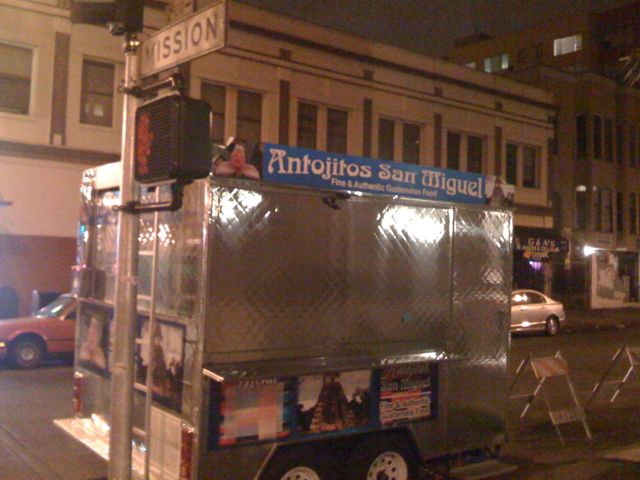
While I can wait for the sandwich, the thought of that damn freshly-baked cookie is killing me right now.
The Chicken’s Involved, But The Pig Is Committed
Some animals *are* more equal than others!

Mission = Mos Eisley?
OK, this is pretty damn impressive:
Found on Nuño Meat Market.
But no Imperials in the Mission? Maybe with all the gang violence, they think it’s like too much like Mos Eisley. So which Mission bar would Han most likely shoot someone in? I say Latin American Club.
PC LOAD LETTER (Old School)
Sitting on the sidewalk near 23rd and Valencia:

Offset UND letterpress? Genau!

But in this case, I bet you have to watch out for the printer attacking *you*, not the other way around:
PC LOAD LETTER indeed.
El Tonayense Taco Truck School’d!
The plot thickens! According to Eater SF and the City Star, the *school* is complaining about the El Tonayense truck on Harrison and 19th. The city sups and the ever-wily SEIU (Service Employee Int’l Union) looks to be involved as well.
Apparently the proximity of the taco truck to O’Connell High creates two classes of students, have (tacos) and have-not (tacos), and somehow puts the school lunch program in jeopardy.
Burrito Justice’s Verdict? DENIED:
- The truck was there before the school.
- Only seniors can go off campus for lunch
- The principal himself goes to the truck for lunch
- According to the City Star, NO students went to the taco truck.
And here’s an interesting new city law:
- Last year, city officials passed a law prohibiting “mobile food vendors” from peddling their wares within 1,500 feet of any school to complement the “wellness policy”
While Burrito Justice’s experience with school lunches harkens back to Reagan Administration era “ketchup is a vegetable” and mountains of government cheese, we strongly suspect that quality of school food has not improved greatly and let’s face it, El Tonayense has quality tacos. In fact, we declare that El Tonayense IMPROVES the city’s “wellness policy” especially if “pizza day” is still the same as it was.
In fact, EaterSF suggested the school contract out school lunches to El Tonayense a day or two a week. The parent running the program enforcing the “wellness” policy blames the SEIU and USDA bureaucracy.
The real tragedy here? NONE of the kids were even going to the taco truck. This highlights a travesty in critical thinking skills of the seniors in that school. Oh, and say the kids WERE hitting the truck — would moving three blocks away really stop them?
A taco denied is justice denied. Viva la Justicia del Burrito!
iPhone 2.1 – the good, the bad, and the future
Things than improved:
- app icons don’t change positions when they are updated
- backup no longer take two hours
- podcast show a new “partially played” semi-circle icon, as well as time remaining — hooray!
- the Apple Logo of Death “too many apps for Springboard to handle” endless reboot cycle seems to have been fixed.
Things that are still bad:
- podcast chapters are not shown in the main play screen under the podcast title, just ‘chapter 14/22’. Check out the enhanced CBC Radio 3 podcast to see why this is annoying. Why the song title and artist? Even the iPod does this. And a bigger font for all titles.
- when I do go into the podcast chapter list, the only indication of the chapter is a tiny little blue triangle. Please, please, please invert the field and text colors, and don’t make me scroll to get to it.
- still can’t click on phone numbers in calendar entries. WTF?
- still can’t rotate Mail, yet a graphic in an email will compress text to 4 point. Come on, guys.
- Safari still crashes regularly. (Try loading Engadget or Gizmodo…)
- battery life with ActiveSync push is atrocious. 3-5 hours at best, thank god for Fetch + ActiveSync which gets me to at least 12 (which still isn’t acceptable compared to the Blackberry, but don’t get me started on power management…)
- Google Maps can’t handle lat/lon entries. Thank you for the useful map of the Atlantic coast of Africa (0,0).
- speaking of Google Maps, could you at least show me coastlines / city names / major roads if I don’t have a network connection? Showing me a green dot in the middle of a blank field is worse than no GPS at all…
- show me new mail summary on the slide-to-unlock screen like you do missed calls and SMS…
- hooking up to car stereos that have USB ports blanks the screen — are you guys NUTS? Thank you for your two-line monocrome display and useless stereo controls and no album art and no podcasts…
This release really should have been called 2.0.1, since the background notification obviously got pulled and delayed.
New features I want:
- mail overview — let me see all mail in all accounts at once
- stream music to an Airport Express
- WiFi music sync. Free Podcaster!
- SlingPlayer. Oh, god, please give me SlingPlayer. But I fear AT$T has crushed this one. (Psst, Sling, provision me one, I won’t tell…)
Here’s to 2.2 in December.